You built a working product without a full engineering team. Six months ago that was not really possible. You described what you wanted to Lovable, or Bolt, or Cursor, and you got something that runs, that demos, that people can click around in and understand. That is a genuine achievement, and anyone in our trade who tells you otherwise is being precious about it.
But a prototype is a proof of the idea. It is not a proof of the product. Those are two different things, and the gap between them is almost entirely invisible from where you are standing. The demo looks finished. The hard part is all the stuff the demo never has to deal with: a second user, a malicious user, a dropped connection, a thousand rows instead of ten, a database that needs to come back after someone deletes the wrong thing.
We do this work most weeks. Founders bring us something they built with AI and ask us to make it real, and we run through more or less the same list every time. Here is that list, in plain terms, so you can run through it yourself before you let a real customer near it.
Why the gap exists
It helps to understand why AI-built prototypes fail in such a consistent, predictable shape. It is not that the tools are bad. It is that they are optimising for the wrong thing for this stage.
An AI coding tool is trying to make the thing work in front of you, now. It writes plausible, confident code fast, and it is very good at the "happy path": the version of events where the network never drops, the input is always well-formed, and only one well-behaved person is using the app at a time. The things it skips are the unglamorous safeguards, the checks and the structure that only ever matter once real users, real data and real money arrive. None of those show up in a demo, so none of them get built. That is not a flaw in you for using the tool. It is a property of the tool.
So the checklist below is really a list of the things that are invisible until they are catastrophic.
The checklist
Security and access
Does the app actually check who you are, or does it just hide the buttons? This is the big one, and it is the one we see fail most often. A client recently showed us an app, generated on Lovable, that was about to become the CRM for their entire business. Any logged-in user could change the ID in the URL and read and edit other users' records: customers, orders, the lot. The interface hid things it was not supposed to show you, but nothing on the server actually enforced who you were or what you were allowed to touch. Hiding a button is not security. The real question is whether every single request is checked on the server, and in AI-built apps the answer is very often no.
Are your secret keys actually secret? The same Lovable app had the SendGrid SMTP keys baked directly into the React front end. Anyone who opened their browser's developer tools could read them and start sending email as the company. API keys, database credentials and tokens belong on the server, never in the code that gets shipped to the browser. This is an easy mistake for an AI tool to make because, again, it works fine in the demo. It just also hands the keys to anyone who looks.
Is user input checked before it reaches the database? In that same app there was effectively no validation. Fields were not tied to the right data type (text inputs collecting numbers), and the wrong input controls were used throughout. Unvalidated input is how apps get broken by accident and exploited on purpose. The app is one malformed entry away from a crash, or worse.
Data and integrity
Will the data structure survive growth, or was it shaped to make the demo work? One prototype we were handed had built a single, massive orders table. Every piece of information about the customer, the order and the products was crammed into one row per item bought. It works beautifully with ten orders. By a thousand, it is a disaster: data duplicated everywhere, impossible to keep consistent, slow to query, painful to change. The demo never reveals this because the demo only ever has ten orders in it. The structure that makes a prototype quick to generate is frequently the structure that makes it impossible to grow.
If your database were deleted tomorrow, could you get it back? Backups are the most boring item on this list and the one most likely to end a business. A prototype almost never has a tested recovery path. The question is not only whether backups exist, but whether anyone has ever actually restored from one. An untested backup is a guess.
What happens when two people act at once, or a payment half-completes? Real systems have to cope with things happening simultaneously and with operations that fail partway through. Without safeguards, the data does not crash loudly; it quietly goes wrong. Two users update the same record and one silently wins. A payment is taken but the order is never recorded. These are the bugs that are hardest to spot and most expensive to unpick, and prototypes are rarely built to prevent them.
Reliability under real use
When something fails, does the app fail safely, or does it show a blank screen and lose the work? AI tools write happy-path code: they get the feature working under perfect conditions and forget to guard against network drops, timeouts and bad responses. The practical result is the dreaded white screen. If a piece of the app tries to display data that never arrived because the connection blinked, the whole thing can crash, freeze, and wipe out anything the user had half-typed in a nearby form.
For the technically minded, this is the shape of it. The AI writes something like:
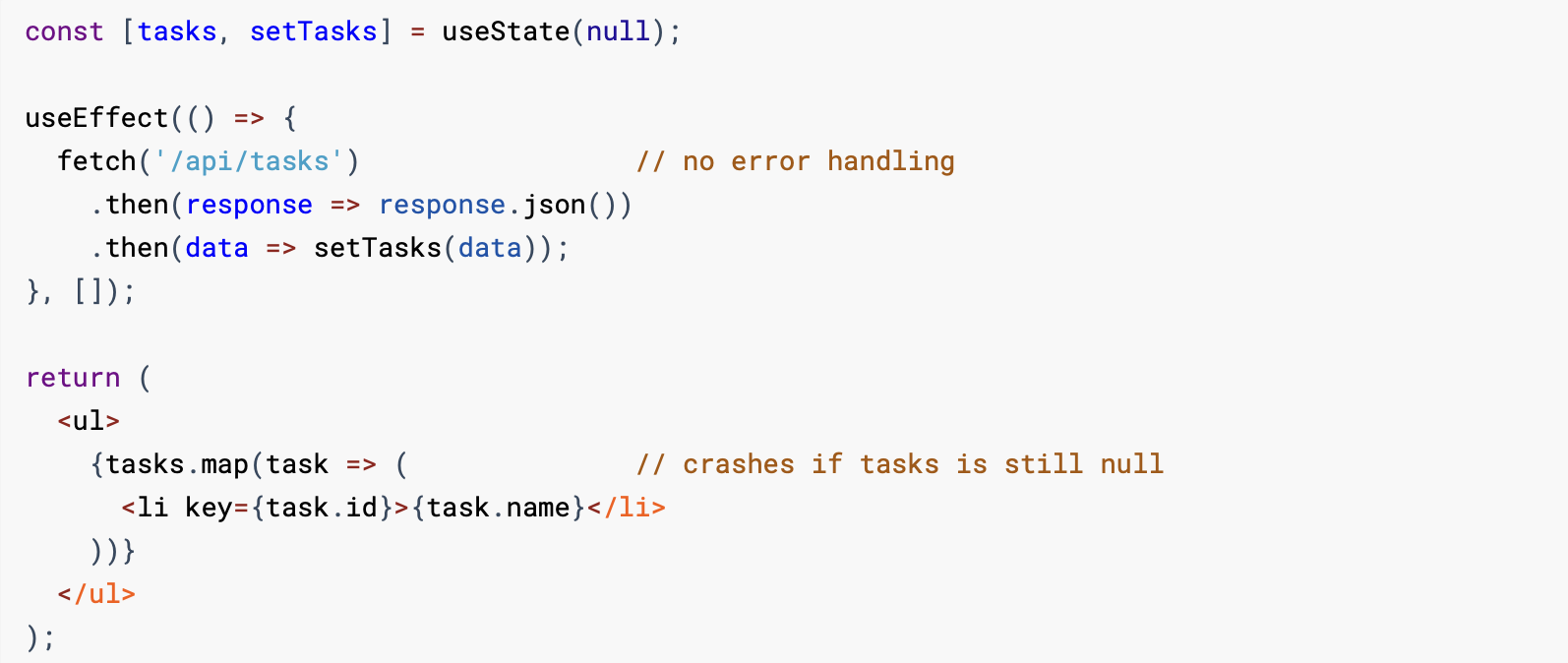
If the request fails for even a moment, the data never arrives, the code tries to work with nothing, and the entire screen goes white. The fix is not complicated for someone who knows to look for it. The point is that the AI did not look for it, because in the demo the request always succeeded. If you are not an engineer, you do not need to read the code: just know that "it works when I try it" and "it works when ten thousand strangers try it on bad Wi-Fi" are very different claims.
Does it hold up for ten users as well as one? Demo-grade approaches often collapse under ordinary traffic. Things that are instant for a single user become slow or fall over when several people use the app at once. This rarely shows up until launch day, which is the worst possible time to discover it.
What is it quietly depending on? Prototypes often lean on free tiers, third-party services and libraries that will not survive production, real billing or real scale. It is worth knowing what your app needs to keep running, and what happens to each of those things when you have customers rather than a demo.
Operability (the part nobody demos)
Is there a safe, repeatable way to ship changes? In a healthy setup, you can make a change, test it somewhere safe, and release it without risking the live app. In many prototypes, the live app is the only version, and every edit is performed with fingers crossed. That is fine for a prototype and untenable the moment people depend on it.
If it breaks at 2am, will you find out before your users do? Production systems need monitoring and logging, so that when something goes wrong you know what, where and when. Prototypes typically have none. The first you hear of a problem is an angry email, and you have nothing to look at to work out why.
Can a human actually maintain this code? This is the quiet long-term killer. Our honest take is that AI is a savant at writing "write-only" code: a hundred lines of dense, deeply nested logic that works perfectly on day one and reads like an impenetrable black box when a human needs to change it six months later. The most common version we meet is the mega-function: all the logic crammed into one place, cryptic variable names, magic patterns, no structure, impossible to test a single piece in isolation.
Concretely, AI loves to produce something like this, a single block that cleans up imported user data:
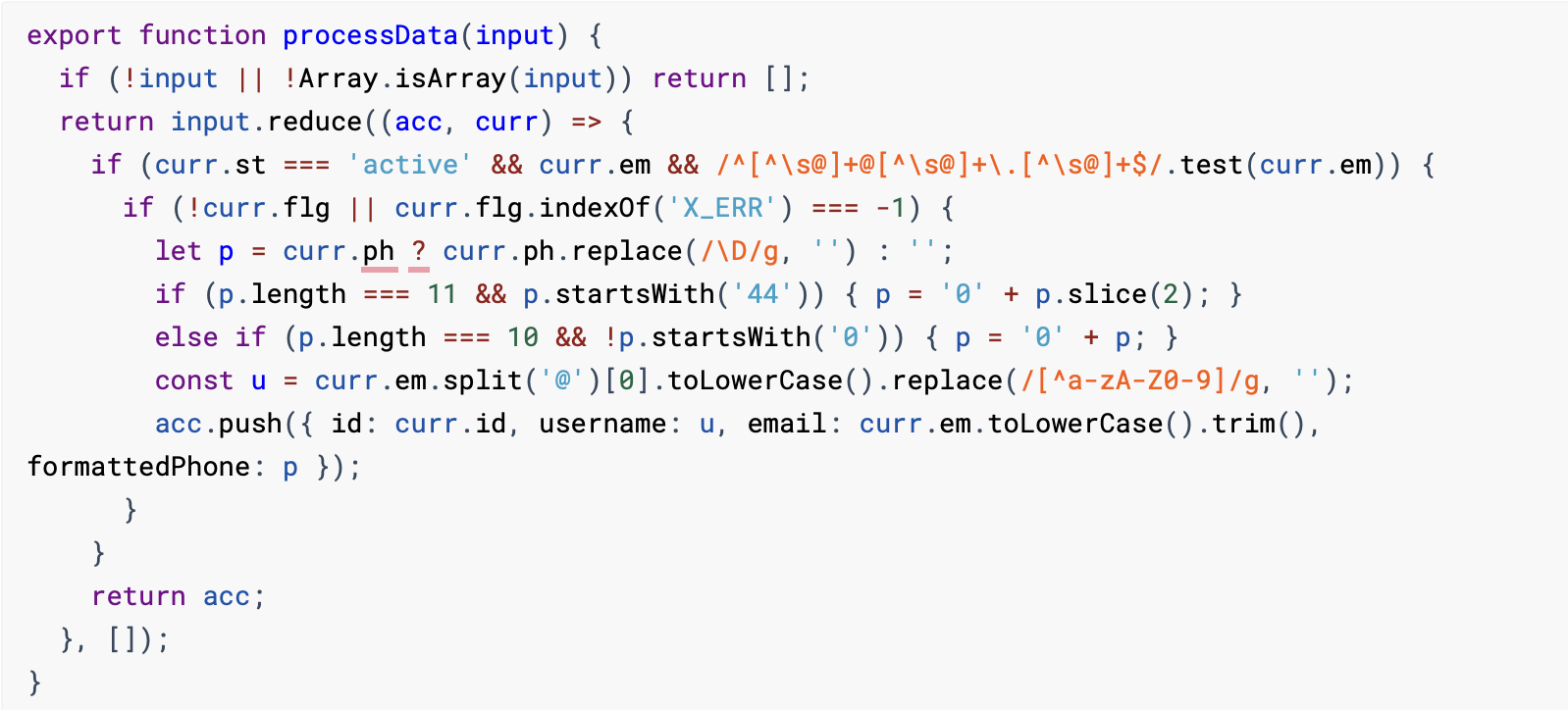
It works. That is the trap. But when a customer reports that phone numbers starting with +44 are coming out wrong, an engineer has to mentally unpick that entire tangle, work out what curr, p and u are meant to be, and reverse-engineer the patterns before they can safely touch anything. Change one business rule and you risk breaking three others, because everything is wound together in one place. You cannot test the phone-formatting on its own. Again, if you are not an engineer, the takeaway is simple: code that one person can prompt into existence is not automatically code a team can safely keep alive, and the difference costs you every time you want to change something.
Compliance and the boring-but-legal
Are you handling personal data lawfully? If your app stores information about people, UK GDPR applies, and it applies from your first real customer, not from some later "proper" version. A prototype is rarely built with this in mind. It is far cheaper to get right before launch than after a complaint.
If money or sensitive data is involved, is it handled to the standard those things require? Payments and sensitive personal information carry legal and security obligations that are not optional and not negotiable. This is not a place to find out later that the prototype took shortcuts.
How to triage your own prototype
That is a long list, and the point of it is not to frighten you out of launching. It is to help you launch with your eyes open. Sort the items into three buckets:
Fix before a single real user touches it. Anything in security and access, and anything that risks losing or corrupting data. If strangers can read each other's records, or your keys are exposed, or your data can vanish without recovery, that is not a launch-day problem you can defer. That is the launch.
Fix shortly after, deliberately. Error handling, performance, monitoring and the operability items generally fall here. You can go live without all of them perfect, as long as you know they are not perfect and you have a plan to close them in order.
Genuinely fine for now. Some structural and maintainability concerns can wait, if you have decided that consciously rather than discovered it by accident. The difference between a calculated shortcut and an unknown landmine is simply whether you knew it was there.
The honest summary: you usually can ship, sooner than the list above might suggest. You just need to know which corners you are cutting and which ones will cut you back.
When to bring in help
Some of this a capable, technical founder can work through. Plenty of people read a checklist like this, recognise the gaps, and close the straightforward ones themselves. We would rather tell you that than pretend everything needs us.
But some of it genuinely does need engineers who have done it before, and it tends to be the same items every time: anything touching security, data integrity or money. Those are the areas where the cost of getting it wrong is not "a bug" but "a breach", "a lost database" or "a regulator's letter", and they are also the areas where the problems are hardest to see from the outside. That Lovable CRM looked completely finished to the people using it. It was one URL edit away from exposing every customer they had.
This is the work we do: taking AI-built prototypes and making them production-ready, and de-risking AI-generated codebases that are already live. If you want to know where on this checklist you actually stand, a code audit is the fastest way to find out. We go through the codebase, tell you plainly what is solid and what is not, and give you the list in priority order, so you can either fix it yourself or hand it to us.
In short
Building it with AI was the right first move. You proved the idea, fast and cheaply, and you got further on your own than founders could a year ago. Production is simply a different discipline from prototyping, with a different set of things to get right. It is not a verdict on what you have made; it is the next stage of making it.
If you would like a second pair of senior eyes on where your prototype stands, start a conversation. We will tell you straight.