Comparing ChatGPT, Claude, Microsoft Copilot and Google Gemini
Artificial intelligence has moved from science fiction to everyday business tool in remarkably short order. Whether you run a small florist shop or manage a large manufacturing operation, AI assistants can now help with tasks that once required significant time and expertise. But with several major platforms competing for attention, choosing the right tool can feel overwhelming.
This guide cuts through the jargon to explain what each of the four leading AI assistants does best, helping you understand which might suit your business needs.
What Are AI Assistants?
AI assistants are software tools that can understand and respond to natural language. Rather than clicking through menus or learning complex commands, you simply type (or speak) what you need help with, much as you would ask a knowledgeable colleague. These tools can draft emails, analyse documents, brainstorm ideas, explain complex topics, help with coding, and much more.
The technology behind them - large language models (LLMs) - has improved dramatically. Today's AI assistants can handle nuanced questions, maintain context across long conversations, and produce remarkably human-like responses.
The Four Main Players
ChatGPT (by OpenAI)
Best for: General-purpose tasks, creative work, and businesses wanting an all-round assistant
ChatGPT is the tool that sparked the AI revolution. Since its launch in late 2022, it has become synonymous with AI assistants for many people. Its strength lies in versatility - it handles everything from drafting marketing copy and answering customer queries to debugging code and explaining technical concepts.
Practical business uses:
- Drafting and proofreading emails, proposals, and reports
- Generating marketing content and social media posts
- Brainstorming product names, taglines, or campaign ideas
- Summarising lengthy documents or meeting notes
- Creating interview questions or job descriptions
Considerations: ChatGPT's popularity means it occasionally experiences slower response times during peak periods. The free version has limitations, and the Plus subscription is needed for the most capable models and features like image generation. Visit chat.openai.com for current pricing.
Claude (by Anthropic)
Best for: Professional writing, document analysis, and businesses handling lengthy or sensitive content
Claude has earned a reputation for producing exceptionally natural, human-sounding text. Many users find its writing requires less editing than other AI tools. It also excels at handling very long documents - you can upload entire contracts, reports, or manuscripts and ask questions about them.
Practical business uses:
- Reviewing and summarising lengthy contracts or policies
- Drafting professional correspondence and formal documents
- Analysing research reports or technical documentation
- Refining and improving existing written content
- Explaining complex topics in accessible language
Considerations: Claude cannot generate images. It also tends to be more cautious than ChatGPT, occasionally declining requests it considers potentially problematic. Visit claude.ai for current pricing.
Microsoft Copilot
Best for: Businesses already using Microsoft 365 (Word, Excel, Outlook, Teams)
Microsoft Copilot's unique advantage is integration. Rather than switching to a separate app, you can access AI assistance directly within the Microsoft tools you already use. Ask Copilot to summarise an email thread in Outlook, generate a formula in Excel, or create presentation slides from a Word document.
Practical business uses:
- Summarising email conversations and extracting action items
- Generating Excel formulas and analysing spreadsheet data
- Creating first drafts of documents from brief prompts
- Catching up on missed Teams meetings with AI summaries
- Searching across your organisation's files and communications
Considerations: Microsoft offers several Copilot tiers. A basic Copilot Chat is now included free with Microsoft 365 subscriptions. For full integration across Word, Excel, PowerPoint, and Teams, Copilot for Microsoft 365 is available as a paid add-on to your existing subscription. Smaller businesses may qualify for reduced pricing. Visit microsoft.com/copilot for current pricing and plan options.
Google Gemini
Best for: Businesses using Google Workspace (Gmail, Docs, Sheets) and those needing multimodal capabilities
Google Gemini mirrors Copilot's approach for Google's ecosystem. It integrates directly into Gmail, Google Docs, Sheets, and Slides. Gemini's particular strength is handling multiple types of content - text, images, video, and audio - making it useful for businesses dealing with varied media.
Practical business uses:
- Drafting and improving content in Google Docs
- Organising and analysing data in Google Sheets
- Summarising email threads and drafting replies in Gmail
- Generating presentation designs in Google Slides
- Analysing images, videos, or documents uploaded for review
Considerations: Google offers several Gemini tiers, with the paid plans including additional cloud storage. Google also includes Gemini features in some Workspace Business and Enterprise plans, so you may already have access. Visit gemini.google.com for current pricing.
Quick Comparison
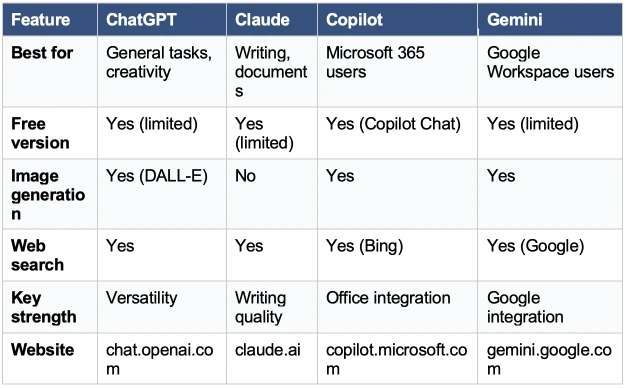
Choosing the Right Tool for Your Business
The best AI assistant for you depends less on which is objectively best and more on how it fits your existing workflows. Here are some practical guidelines:
If your team lives in Microsoft 365: Copilot makes the most sense. Having AI assistance appear directly in Word, Excel, and Outlook removes friction and encourages adoption. The ability to search across your organisation's documents and emails is particularly valuable for larger teams. Note that basic Copilot Chat is now included free with Microsoft 365 subscriptions, while full app integration requires a paid add-on.
If your team uses Google Workspace: Gemini offers similar integration benefits. Google has started including Gemini features in some Workspace plans, so you may already have access without additional cost.
If you need a standalone assistant: ChatGPT and Claude are the strongest options. ChatGPT offers broader capabilities including image generation, while Claude produces more polished writing and handles longer documents better. Many professionals keep both available and use each for different tasks.
If you are just getting started: Try the free versions first. All four platforms offer free tiers that let you experience their capabilities before committing. Spend a few weeks using them for real tasks before deciding which deserves a paid subscription.
Real-World Examples
A small retail business might use ChatGPT to generate product descriptions, social media captions, and respond to common customer queries. The free tier may be sufficient for occasional use, with a paid subscription providing faster responses during busy periods.
A manufacturing company could use Copilot to analyse production data in Excel, summarise lengthy supplier contracts, and help draft technical documentation. The integration with existing Microsoft infrastructure makes adoption smoother across departments.
A professional services firm might prefer Claude for reviewing legal documents, drafting client proposals, and producing reports that require polished, professional language with minimal editing.
A creative agency could use Gemini for brainstorming sessions, analysing competitor materials (including images and videos), and generating presentation designs directly in Google Slides.
Important Considerations
Accuracy: AI assistants can make mistakes, sometimes confidently stating incorrect information. Always verify important facts, especially for business-critical decisions, legal matters, or anything published publicly.
Data privacy: Consider what information you are sharing with these tools. While the major providers have business-grade privacy policies, avoid entering truly sensitive data (personal identifiers, financial details, trade secrets) unless you have reviewed the relevant terms of service.
Human oversight: These tools work best as assistants rather than replacements. Use them to create first drafts, generate ideas, and handle routine tasks - but apply human judgement to the final output.
Rapid evolution: This field moves quickly. Features and pricing change regularly, and new capabilities appear frequently. Always check the provider's website for current pricing and features before subscribing.
Getting Started
The best way to understand AI assistants is to use them. Here is a practical approach:
1. Identify two or three tasks you do regularly that involve writing, analysis, or research.
2. Try completing those tasks with the free version of ChatGPT or Claude.
3. If you use Microsoft 365 or Google Workspace, explore the AI features already available in your plan.
4. After a few weeks, assess which tool saves you the most time and produces results you are happy with.
5. Consider a paid subscription only after you have identified genuine value from the free tier.
The Bottom Line
AI assistants have matured from novelty to necessity for many businesses. While no single tool is perfect for every situation, the four platforms discussed here - ChatGPT, Claude, Microsoft Copilot, and Google Gemini - represent reliable, capable options that can genuinely improve productivity.
The key is matching the tool to your needs: consider your existing software ecosystem, the types of tasks you will use AI for most often, and your budget. Start with free tiers, experiment practically, and upgrade when the value becomes clear.
Whatever your business size - whether a local florist or a large manufacturing operation - there is an AI assistant that can help you work more efficiently. The question is not whether to explore these tools, but which one fits your world best.